
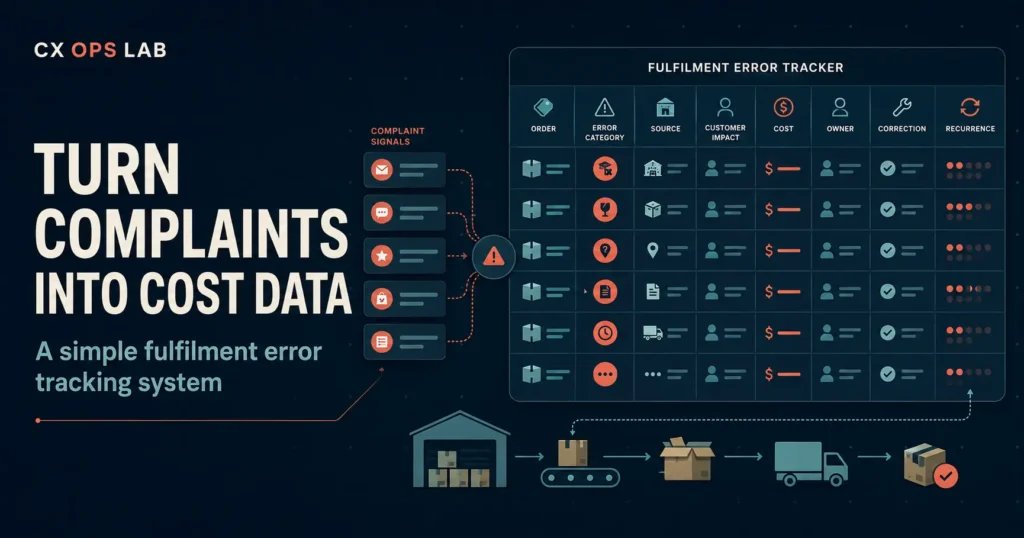
A customer writes in because the box arrived with the wrong size inside. Support apologises, ships a replacement, closes the ticket. Three days later, someone else gets a cracked bottle. Different SKU, different warehouse zone, same ending: apology, replacement, closed ticket. Nobody connects the two, because nothing in the workflow is built to connect them. By the time a founder notices the pattern, it usually shows up somewhere expensive — a refund rate that’s crept up, a support inbox that’s fuller than it should be, or a one-star review that mentions “second time this happened.” Fulfilment error tracking exists to catch that pattern months before it reaches any of those places.
Why complaints alone don’t show you the real fulfilment problem
Every fulfilment mistake generates a support ticket, but a support ticket isn’t operational data. It’s a record that a customer was inconvenienced, resolved on its own timeline, then archived. Most helpdesk tools weren’t built to answer “which SKU has thrown the most picking errors this month” or “did this happen at the same warehouse shift twice.” They were built to close conversations, not to expose the process failure sitting underneath them.
That’s the real gap. A wrong-item shipment and a damaged-in-transit claim look identical from the customer’s side — box arrived wrong, refund or replacement requested — but they come from completely different points in the fulfilment chain. One is a picking error. The other might be a packing material issue or a courier handling problem. Treat them the same way in your reporting and you’ll never find out which one is actually costing you money, because you’re averaging two unrelated failure types into one vague “customer complaints” number.
There’s also an ownership gap that keeps this invisible. Support resolves the ticket. Warehouse never hears about it unless someone forwards the email. Nobody is assigned to ask why it happened, so the same error type quietly repeats until volume forces the question. This is the same structural weakness covered in How Untracked Return Inventory Quietly Becomes a Warehouse and Brand Risk — problems that live between departments don’t get fixed by either department, because neither one owns the full picture.
What actually counts as a fulfilment error
Before building a tracker, it helps to draw the line clearly. A fulfilment error is any mistake that happens after an order is confirmed and before it reaches the customer correctly. In practice, that usually breaks into a handful of repeatable categories:
- Wrong item shipped — picking error, most common in operations with lookalike SKUs or manual picking
- Wrong quantity — short-shipped or over-shipped units
- Damaged in transit — packaging failure, courier mishandling, or both
- Missing item from a multi-item order — a packing miss, not a picking miss
- Mislabelled package — correct contents, wrong shipping label or address
- Late dispatch beyond the promised window — not always logged as an “error,” but it generates the same complaint volume
Industry benchmarks put the typical fulfilment error rate somewhere between 1% and 3% of orders for operations without automated verification, with each individual error carrying a real cost once you count replacement stock, return shipping and support time — commonly estimated in the $50–75 range per incident. That’s before factoring in the customer who quietly stops ordering. The number matters less than the habit of counting it, but it does explain why a small, unmeasured error rate can sit under a growing refund line for months without anyone naming the cause.
CONTEXTUAL CTA
If you’re not sure whether fulfilment errors are your biggest operational leak or a smaller piece of a bigger pattern, the fastest way to find out is a structured check rather than a guess. Take the free 25-question Ecommerce Operations Health Check. It takes about five minutes and shows which operating area needs attention first.
Start the free Ecommerce Operations Health Check → https://cxopslab.io/ecommerce-operations-health-check/
The eight fields a fulfilment error tracking system actually needs
You don’t need a warehouse management system to start. A shared spreadsheet with the right columns, updated the same day an error is caught, will outperform no system at all — and it’s usually the first version any operation runs before graduating to something more automated. Eight fields cover the cases that matter:
- Order ID — ties the error back to the original order and customer record
- Error type — pick from the categories above; consistency here is what makes the data usable later
- Source — which step failed: picking, packing, labelling, courier handoff, or inventory record
- Customer impact — what the customer experienced and what they were told
- Cost — replacement unit cost, return shipping, expedited reshipment, or refund issued
- Owner — who is responsible for investigating, not just who resolved the ticket
- Correction taken — the specific fix applied to this order
- Recurrence flag — has this exact failure type happened with this SKU, zone or shift before
The recurrence flag is the field most operations skip, and it’s the one that turns a log into a system. A single wrong-item shipment is a mistake. The same SKU triggering three wrong-item shipments in a month is a picking process that needs a fix — different problem, different owner, different urgency.
A worked example
It helps to see the eight fields filled in once, because the value of the tracker isn’t obvious until the row actually tells you something.
Order #4821 arrives with the wrong colourway. The customer emails, gets a replacement shipped same day, and the ticket closes as resolved within a few hours — a clean support outcome. Logged into the tracker, that same order reads differently: error type is “wrong item,” source is “picking,” customer impact is “replacement requested, original item to be returned,” cost is the replacement unit plus return shipping, owner is the warehouse lead rather than the support agent who handled the ticket, correction taken is “replacement dispatched,” and recurrence flag gets checked against the SKU history — this is the third wrong-item error tied to that product in five weeks.
On its own, order #4821 is a two-minute fix. Against the recurrence history, it’s the third data point pointing at a mislabelled bin location or a packing instruction that’s easy to misread. That’s the difference between a support log and an operating system: the same event, read two different ways, produces two completely different next actions.
Common mistakes when starting a tracker
Logging the resolution instead of the cause. It’s tempting to write “replacement sent” and move on. That field matters, but on its own it tells you nothing about why the order went wrong in the first place. Source and error type are the two columns that actually explain the failure — skip them and the tracker becomes a to-do list, not a diagnostic tool.
Letting support own it alone. Support is well placed to capture what happened, but rarely has visibility into picking, packing or warehouse layout. If the owner field always says “support,” the corrections will stay support-side too — faster replacements, better apology emails — while the underlying process keeps producing the same errors.
Reviewing it too rarely. A tracker checked once a quarter is closer to a postmortem than a management tool. Errors compound fastest in the weeks nobody’s looking, especially around new SKU launches or a shift change in the warehouse. A ten-minute weekly scan catches a pattern while it’s still three or four incidents, not thirty.
Treating every error as equally urgent. A cracked bottle and a mislabelled shipping address both need fixing, but they don’t need the same response speed or the same owner. Sorting by cost and recurrence, rather than reacting to whichever complaint arrived most recently, is what keeps the tracker useful instead of just busy.
Turning a spreadsheet into decisions
A tracker only earns its place if someone reviews it on a fixed schedule. Weekly is usually enough for most DTC volumes; daily only makes sense once error counts are high enough that a week’s delay would mean dozens of repeat cases. The review itself doesn’t need to be complicated:
Sort by SKU. If one product keeps appearing, the issue is likely with that item’s packaging, storage location or picking instructions — not a general “training problem.”
Sort by source. If most errors trace back to packing rather than picking, the fix is closer to the packing station than to inventory accuracy.
Total the cost column. This is the number that turns a shrug into a decision. A handful of errors costing $50 each looks tolerable in isolation. The same pattern totalled over a month, tied to a specific SKU, usually isn’t.
Check for stock-out overlap. Error rates often spike during out-of-stock periods, when substitutions, partial shipments and manual overrides replace the normal picking process. If your tracker shows a cluster of errors lining up with an OOS event, that’s worth reading alongside how the operation protected revenue during the same period — the approach covered in How We Retained Over 65% of At-Risk Revenue With Proactive Out-of-Stock Customer Communication.
None of this requires new software. It requires someone treating the tracker as a working document instead of an archive — updated the day an error is caught, reviewed on a fixed day every week, and used to make one change at a time rather than a full process overhaul.
What this looks like once volume grows
Tracking gets more valuable, not less, as order volume climbs. Errors that are rare enough to ignore at 50 orders a month become a measurable cost line at 500. In a real multi-platform DTC operation running solo across Shopify, Shopee and Lazada — 9,025 orders over nine months, with an overall refund rate held to 1.71% — fulfilment issues were one of several categories tracked separately from returns caused by buyer preference, precisely because they have different root causes and different fixes. Lumping every refund reason into one number hides which lever actually moves it.
The point isn’t that every operation needs the same level of granularity from day one. It’s that the categories should exist before the volume demands them, because retrofitting a tracking system onto months of unlabelled complaints is far harder than starting with eight columns and a weekly ten-minute review.
FINAL CTA
Fulfilment errors are one piece of a bigger operational picture — the same picture that includes refund handling, customer communication and escalation ownership. If you’re not sure where fulfilment error tracking ranks against everything else pulling at your attention this quarter, the health check is built to answer exactly that. Take the free 25-question Ecommerce Operations Health Check. It takes about five minutes and shows which operating area needs attention first.
Start the free Ecommerce Operations Health Check → https://cxopslab.io/ecommerce-operations-health-check/
About CX Ops Lab
CX Ops Lab publishes operational frameworks, SOP templates, and case-study content built from real DTC ecommerce operations — not theory. Every framework was pressure-tested during live operational conditions across Shopify, Shopee, and Lazada at $610,000+ USD GMV scale.
Website: cxopslab.io │ Products: payhip.com/CXOpsLab